About subtitle.im
subtitle.im is a powerful Chrome extension that automatically manages YouTube captions and detects burned-in subtitles to eliminate duplicate text overlays. Enjoy a seamless viewing experience with custom rules for channels and individual videos.
Key Features
Intelligent Auto-Toggle
Set your global preference for YouTube captions once, and the extension will automatically apply it to every video you watch. Whether you prefer captions always on or always off, the tool ensures your viewing experience remains consistent without manual intervention.
Burned-in Subtitle Detection
Using advanced local OCR technology, the extension identifies burned-in subtitles that are part of the video image. This allows you to manage situations where YouTube's native captions overlap with existing text, preventing visual clutter.
Granular Rule Management
Go beyond global settings by creating custom rules for specific YouTube channels or individual videos. This flexibility allows you to handle unique content creators or specific video formats differently than your default preferences.
Privacy-First Local Processing
All frame sampling and text recognition occur locally within your Chrome browser. No video data or personal information is uploaded to external servers, ensuring your viewing habits remain private and secure.
Seamless Caption Restoration
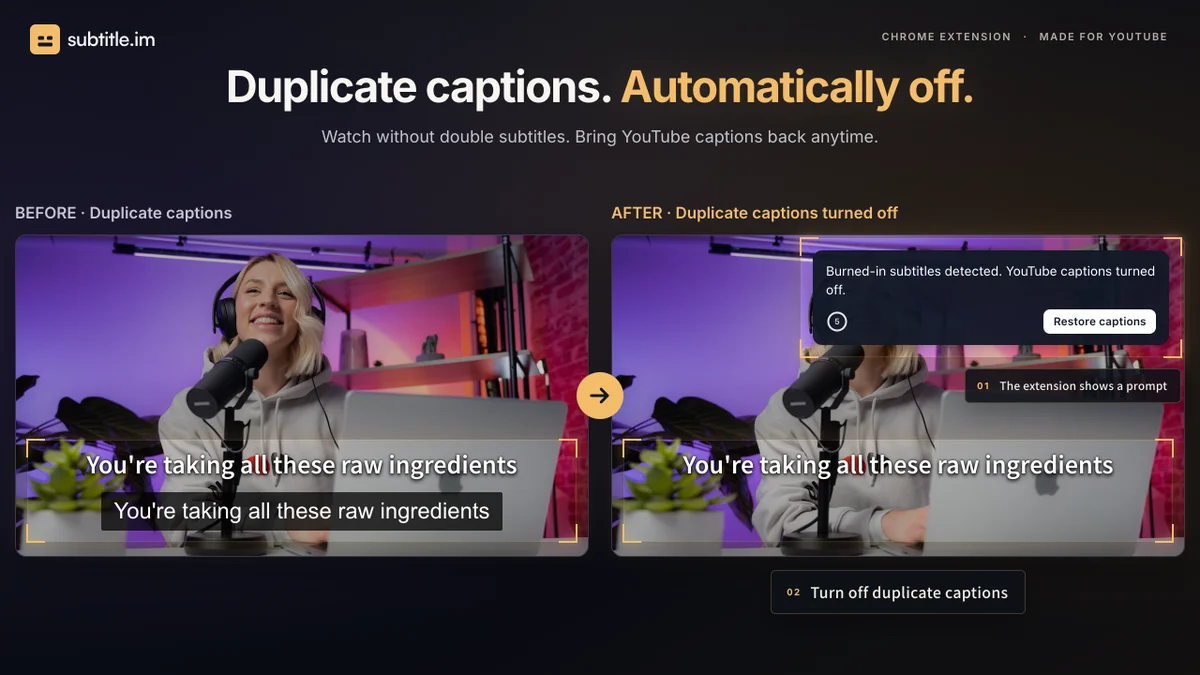
If the extension hides a caption track that you actually wanted to see, you can easily restore it with a single click. The tool is designed to be non-destructive, leaving the original video and burned-in subtitles completely untouched.
Use Cases
Eliminating Duplicate Captions
When a video has both burned-in subtitles and YouTube's native CC, it often creates a distracting double-text effect. Use this tool to automatically disable the native captions while keeping the burned-in text visible.
Consistent Accessibility
For users who rely on captions for every video, the auto-open feature ensures you never have to manually click the CC button again. It automatically detects available tracks and enables them the moment a video starts.
Managing Multilingual Content
If you watch videos where the burned-in subtitles are in one language and the YouTube CC track is in another, you can set rules to keep both visible or hide one based on your specific language preferences.
Decluttering Educational Content
Many educational channels have permanent burned-in text that makes native YouTube captions redundant and messy. Set a channel-level rule to auto-close captions for these creators to maintain a clean, professional viewing environment.
Streamlining Binge-Watching
Avoid the repetitive task of turning captions on or off for every new video in a playlist. By setting a global preference, you can binge-watch your favorite content with your preferred caption settings applied automatically.
Frequently Asked Questions
How does the tool handle burned-in subtitles?
The extension uses local OCR to scan video frames for burned-in text. Once detected, it allows you to configure how the extension interacts with YouTube's native CC tracks to avoid duplicate text overlays.
Is my privacy protected during OCR processing?
Yes, all processing is done locally within your browser. No video frames or personal data are ever uploaded to a server, ensuring your privacy is maintained while using the extension.
Can I set different rules for different channels?
Absolutely. While you can set a global default, the extension supports specific rules for individual channels and even unique settings for specific videos to give you total control.
What happens if I want to see the captions again?
If the extension hides a caption track, you can easily restore it using the undo or restore options in the extension prompt. This action is temporary for that specific viewing session.
Does this tool work on all YouTube videos?
It works on most videos, though detection accuracy can be affected by low resolution, complex lettering, or unusual subtitle placement. It is designed to handle common, clear burned-in subtitles effectively.