About Zubtitle
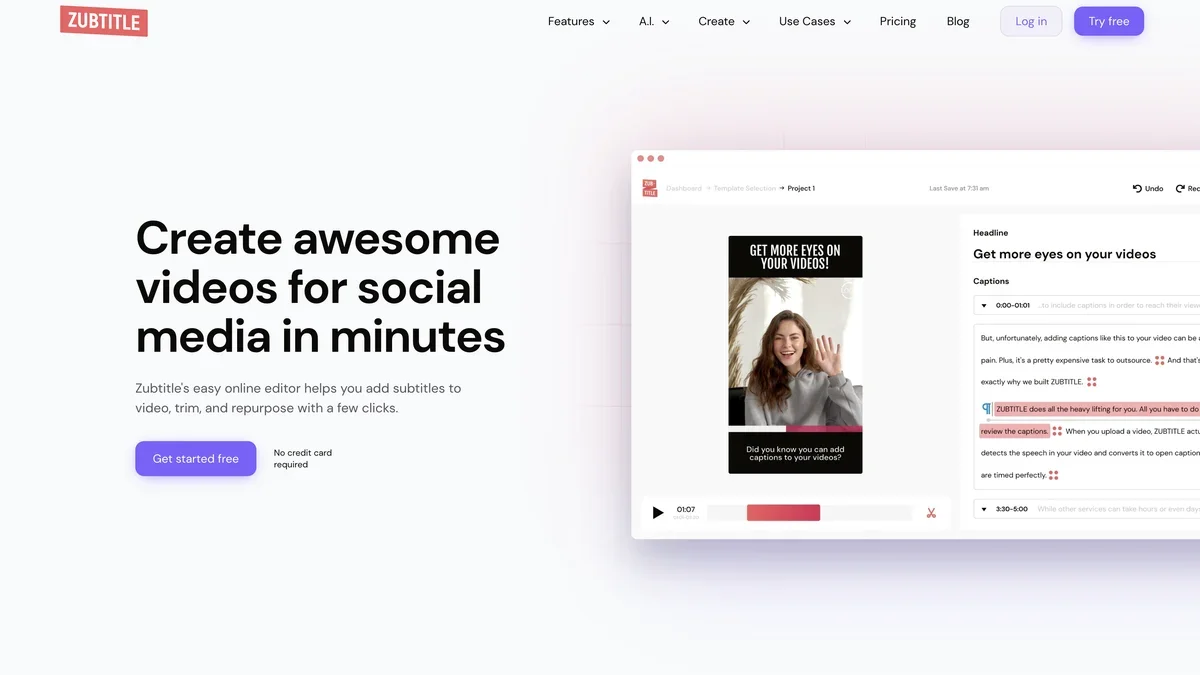
Zubtitle's easy online editor helps you add subtitles to video, trim, and repurpose with a few clicks.
Key Features
AI-Powered Transcription
Zubtitle uses advanced speech recognition technology to automatically transcribe audio into text, providing highly accurate initial captions.
Easy Subtitle Editing
Users can easily review and edit the generated subtitles directly within the platform using a user-friendly interface, ensuring perfect synchronization and accuracy.
Multi-Language Translation
The tool offers automated translation capabilities, allowing creators to quickly generate subtitles in multiple languages for global reach.
Custom Styling and Branding
Customize the appearance of your subtitles, including font, color, size, and positioning, to match your brand guidelines or video aesthetic.
Burned-in Subtitles (Hardcoding)
Easily burn subtitles directly into your video files, ensuring they appear consistently regardless of where the video is played.
Use Cases
Enhancing Video Accessibility
Use Zubtitle to quickly add accurate captions to videos, making them accessible to viewers who are deaf or hard of hearing, or those watching in sound-off environments.
Global Content Localization
For businesses targeting international audiences, Zubtitle automates the translation of subtitles, enabling rapid localization of marketing and training videos.
Improving Social Media Engagement
Create engaging short-form videos for platforms like Instagram Reels or TikTok by adding stylized, burned-in subtitles that capture attention immediately.
Streamlining Post-Production Workflow
Video editors and agencies can significantly reduce the time spent on manual subtitling and translation tasks by leveraging Zubtitle's automation features.
Creating Training and Educational Content
Develop clear, captioned educational materials where precise synchronization between audio and text is crucial for learner comprehension.
Frequently Asked Questions
How accurate is the AI transcription?
The accuracy of the AI transcription is very high, often exceeding 95%, but users always have the option to manually review and correct any errors within the editor.
Can I download the subtitles in different formats?
Yes, Zubtitle supports exporting subtitles in standard formats like SRT, VTT, and others, as well as burning them directly into the video file.
Is there a free plan available?
Zubtitle typically offers a freemium model, allowing users to test the core features with certain limitations, such as video length or export capabilities.
Does it support rare languages for translation?
The tool supports a wide range of popular languages for translation, though specific language availability should be checked on their pricing or features page.
Can I upload my own audio files?
Yes, the platform is designed to process video files, but it can often work with audio tracks extracted from videos or uploaded separately for transcription purposes.